Digitale Bildbeschreibung im internationalen Standard
IPTC, XMP und Exif
Das Programm CaptionWriter II ist ein komfortables Werkzeug zur Beschreibung digitaler Bilder. Die Beschreibung wird in Anlehnung an die IPTC/NAA-Norm und kompatibel zu den Adobe Photoshop Dateiinformationen (Version 3.0 und höher) in der Bilddatei gespeichert. Dabei wird das Bild nicht erneut komprimiert.
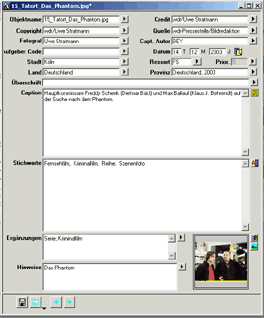
Seit Version 5.0 unterstützt der CaptionWriter II auch die Exif-Daten, die die Digitalkameras erzeugen. Eine Auswahl von Feldern, u. a. die Datums- und Zeitangaben, lässt sich mit dem CaptionWriter II editieren. Die anderen Felder können einzeln gelöscht werden. Die vom CaptionWriter II erstellten Beschreibungen können in Adobe Photoshop angezeigt und verändert werden. Nahezu alle professionellen Produktions- und Archivsysteme für digitale Bilder können die vom CaptionWriter II erzeugten Daten problemlos interpretieren und in die eigene Datenstruktur umwandeln.CaptionWriter II faßt die umfangreichen Beschreibungsmöglichkeiten der IPTC/ANPA-Norm zusammen und ermöglicht es dem Benutzer, die wichtigsten Informationen über ein Bild in einer Eingabemaske einzugeben oder auf einen Schlag sichtbar zu machen.
CaptionWriter II unterstützt jetzt neben JPEG und TIFF auch alle Adobe-Formate (z.B. PDF, PSD etc.). Diese Formate können von fast allen Bildverarbeitungssystemen erzeugt und verarbeitet werden.
Der CaptionWriter II unterstützt auch das XMP-Format und schreibt die IPTC- und Exif-Daten zusätzlich im
XMP-Format in den Header.
Die Vorteile:
- Die Daten, die mit CaptionWriter II abgespeichert werden, sind in jeder Hinsicht konform mit den Photoshop©-Dateiinformationen.
- Der CaptionWriter II wird damit schon Heute zukünftigen Entwicklungen bei Archivsystemen gerecht. Bilder, die mit
CaptionWriter II beschrieben werden, sind somit auch für die nächste Generation von Archivsystemen vorbereitet.
Systemvoraussetzungen für Macintosh:
Max OS X
64 MB freien Hauptspeicher
QuickTime(TM) 4.0 oder höher
Systemvoraussetzungen für Windows:
Windows XP / Vista / 7
64 MB freien Hauptspeicher
QuickTime(TM) 4.0 oder höher
NEU: Version 6.0
- Alle Adobe-Formate werden unterstützt
- Kürzel für wiederkehrende Begriffe (Makros)
- Rückgängig-Funktion
- Variabel aufziehbares Editorfenster
- Rechtschreibprüfung (Nur unter Mac OS X)
- Unterstützung langer Dateinamen
- Anzahl Stichworte werden engezeigt
- XMP-Import/Export über mehere Bilder
Kompatibel zu allen aktuellen Systemen
Alle Adobe-Formate Neben den bisher vom CaptionWriter II unterstützten Formaten JPEG und TIFF können mit der Version 6.0 nun auch viele Formate wie PDF, PSD, PNG, AVI usw. beschriftet werden.
Kürzel für wiederkehrende Begriffe (Makros)
Sie können in Version 6.0 nun Kürzel definieren, die für häufig wiederkehrende Begriffe, Sätze oder ganze Absätze genutzt werden können.
Rückgängig-Funktion
CaptionWriter II bietet nun in der Version 6.0 eine praktische Rückgängig-Funktion.
Variabel aufziehbares Editorfenster
Die Größe des Editorfensters ist nun variabel. Sie können es beliebig aufziehen.
Rechtschreibprüfung (Nur unter Mac OS X)
Die Mac-Version des CaptionWriter II 6.0 bietet nun eine Rechtschreibprüfung. Fehler werden farbig unterschrichen. Natürlich ist diese auch lernfähig.
Multipler XMP-Export
Mit Version 6.0 können die Informationen einer Auswahl von Bildern in XMP-Dateien exportiert werden.
Hier zum Download
Unterstützte Betriebssysteme
Mac OS X
Windows XP / Vista / 7