CaptionWriter II 6.0
Basisversion
Mit der Basisversion bieten wir Ihnen einen professionellen IPTC- und Exif-Editor mit vielen Automatismen zu einem günstigen Preis.
Das Galeriefenster bietet neben der Leuchttischdarstellung einen Datei-Browser, in dem Sie Dateien kopieren, verschieben oder löschen können und per Mausklick das Galerieverzeichnis wechseln. Die Dateien aller Unterverzeichnisse können in einer Galerie angezeigt werden.
Die Thesaurusfunktion wurde stark erweitert und bietet eine echte Erleichterung für die Verschlagwortung.
Mit der Funktion "Mehrfachbeschreibung" können alle Bilder eines Verzeichnisses inkl. aller Unterverzeichnisse beschrieben werden. Dabei ist es auch möglich, Ergänzungen oder Korrekturen vorzunehmen.
Das Editorfenster bietet eine übersichtliche Darstellung aller relevanten IPTC- und Exif-Felder. Zu jedem Feld können Sie sich PopUp-Menüs anlegen, zur Verschlagwortung steht Ihnen ein Thesaurus zur Verfügung, den Sie editieren können. Standard-Einträge können definiert werden, die dann immer automatisch eingesetzt werden.
Hier eine Übersicht über die wichtigsten Funktionen:
- Galeriedarstellung mit Browser-Leiste
- Sortierung nach verschiedenen Kriterien
- Mehrfachbeschreibung aller ausgewählten Bilder
- Übersichtliches und komfortables Eingabefenster
- Eine Vielzahl von Eingabe-Automatismen
- Undo-Funktion
- Rechtschreibprüfung (Nur Mac)
- Makro-Funktion
- Administrierbarer und zentraler Thesaurus
- Automatische Übernahme von Systemvariablen
- Erstellung von Standard-Beschreibungen
- Automatische Beschriftung ganzer Bilderordner (inkl. Unterordner)
- XMP-Daten werden geschrieben und gelesen
- Druckfunktionen mit Preview
- Passwort-Schutz für dieVoreinstellungen
- Durch Module erweiterbar
- Läuft unter Windows XP / Vista / 7 und Mac OS X
CaptionWriter II 6.0
Module
Find&Replace-Modul
Das Find&Replace-Modul ermöglicht die Volltextsuche über alle IPTC-Informationen der Bilder, die in einem Verzeichnis (inkl. Unterverzeichnisse) vorliegen. Das Suchergebnis wird in einer eigenen Galerie angezeigt. Suchbegriffe können dann ersetzt werden, wobei der Suchbegriff in allen gefundenen Bildern direkt in den IPTC-Daten ersetzt wird.
ImportExport-Modul
Das ImportExport-Modul ermöglicht es, IPTC-Informationen ausgewählter Bilder (auch Ordnerweise) in eine Textdatei zu exportieren. Dabei sind die Feldreihenfolge und die Datensatz- und Feldtrenner frei definierbar. Umgekehrt können Texte importiert werden. Diese werden dann direkt als IPTC-Informationen in die Bilddateien geschrieben. Dies ist z.B. interessant, wenn analog vorliegende Bilder digitalisiert werden und die dazugehörigen Bildinformationen in einer Textdatenbank oder Exeldatei bereits vorliegen. Die hier für einen Import bzw. Export erstellten Einstellungen lassen sich nun auch speichern und können bei Bedarf einfach geladen werden.
Workflow-Modul
Über frei definierbare Schaltflächen werden die markierten Bilder verschoben, kopiert, gerdruckt oder gelöscht. Beim Kopieren und Verschieben können die Dateien automatisch umbenannt werden.Die Schaltflächen sind als Buttons aus der Galerie, dem Editor Fenster und dem Vorschaufenster jederzeit ausführbar.
FolderWatch-Modul
Mit Hilfe des FolderWatch-Moduls lassen sich beliebig viele Ordner überwachen. Optional wird der Benutzer durch eine Meldung, einem Warnsignal oder einem blinkenden Icon darauf hingewiesen, daß sich der Inhalt eines Ordners verändert hat.
AppleScript-Modul
Mit dem AppleScript-Modul lassen sich die Funktionen des CaptionWriter II durch eigene Scripte automatisieren.
CaptionWriter II 6.0
Pro-Version
Die Pro-Version entspricht der Basisversion inklusive aller Module.
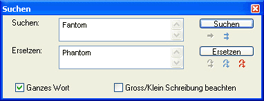
Volltextsuche über die IPTC-Header
_
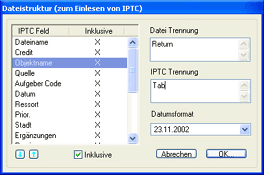
Frei konfigurierbarer Im- und Export
_
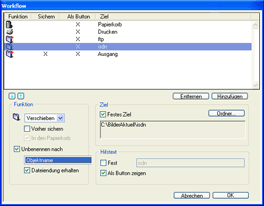
Frei definierbare Schaltflächen
_
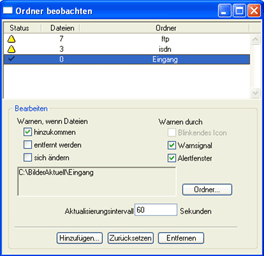
Ordner beobachten